Local corporate APT repositories
Vincent Bernat
Distributing software efficiently across your platform can be difficult. Every distribution comes with a package manager which is usually suited for this task. APT can be relied upon when using Debian or a derivative.
Unfortunately, the official repositories may not contain everything you need. When you require unpackaged software or more recent versions, it is possible to set up your own local repository.
Most of what is presented here was set up for Dailymotion and was greatly inspired by the work done by Raphaël Pinson at Orange.
Setting up your repositories#
There are three kinds of repositories you may want to set up:
-
A distribution mirror. Such a mirror will save bandwidth, provide faster downloads and permanent access, even when someone types Google into Google.
-
A local repository for your own packages with the ability to have a staging zone to test packages on some servers before putting them in production.
-
Mirrors for unofficial repositories, like Ubuntu PPA. To avoid unexpected changes, such a repository will also get a staging and a production zone.
Before going further, it is important to understand what a
repository is. Let’s illustrate with the following line from my
/etc/apt/sources.list:
deb http://ftp.debian.org/debian/ unstable main contrib non-free
In this example, http://ftp.debian.org/debian/ is the repository
and unstable is the distribution. A distribution is subdivided
into components. We have three components: main, contrib, and
non-free.
To set up repositories, we will use reprepro. This is not the only solution but it has a good balance between versatility and simplicity. reprepro can only handle one repository. The first choice is about how you will split your packages into repositories, distributions, and components.
Update (2019-06)
aptly is an alternative to reprepro. It handles multiple repositories. It features an HTTP API. It can keep older versions of a package. To mirror complete distributions, reprepro is more performant but for everything else, I advise you to use aptly.
Here is what matters:
- A repository cannot contain two identical packages (same name, version, and architecture).
- Inside a component, you can only have one version of a package.
- Usually, a distribution is a subset of the versions while a
component is a subset of the packages. For example, in Debian,
with the distribution
unstable, you choose to get the most recent versions while with the componentmain, you choose to get DFSG-free software only.
If you go for several repositories, you will have to handle several reprepro instances and won’t be able to easily copy packages from one place to another. At Dailymotion, we put everything in the same repository but it would also be perfectly valid to have three repositories:
- one to mirror the distribution;
- one for your local packages; and
- one to mirror unofficial repositories.
Here is our target setup:
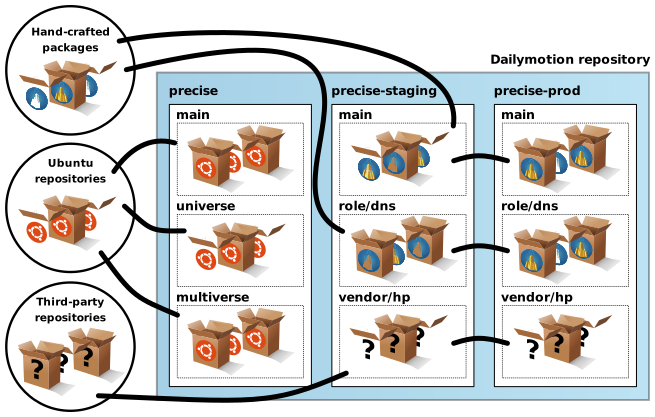
Initial setup#
First, create a system user to work with the repositories:
$ adduser --system --disabled-password --disabled-login \
>         --home /srv/packages \
>         --group reprepro
All operations should be done with this user only. If you want to set up several repositories, create a directory for each of them. Each repository has these subdirectories:
conf/contains the configuration filesgpg/contains the GPG stuff to sign the repository1logs/contains the logswww/contains the repository that should be exported by the web server
Here is the content of conf/options:
outdir +b/www
logdir +b/logs
gnupghome +b/gpg
Then, you need to create the GPG key to sign the repository:
$ GNUPGHOME=gpg gpg --gen-key
Please select what kind of key you want:
   (1) RSA and RSA (default)
   (2) DSA and Elgamal
   (3) DSA (sign only)
   (4) RSA (sign only)
Your selection? 1
RSA keys may be between 1024 and 4096 bits long.
What keysize do you want? (2048) 4096
Requested keysize is 4096 bits
Please specify how long the key should be valid.
         0 = key does not expire
      <n>  = key expires in n days
      <n>w = key expires in n weeks
      <n>m = key expires in n months
      <n>y = key expires in n years
Key is valid for? (0) 10y
Key expires at mer. 08 nov. 2023 22:30:58 CET
Is this correct? (y/N) y

Real name: Dailymotion Archive Automatic Signing Key
Email address: the-it-operations@dailymotion.com
Comment:
[…]
By setting an empty password, you allow reprepro to run unattended. You will have to distribute the public key of your new repository to let APT check the archive signature. An easy way is to ship it in some package.
Local mirror of an official distribution#
Let’s start by mirroring a distribution. We want a local mirror of Ubuntu Precise. For this, we need to do two things:
- Set up a new distribution in
conf/distributions. - Configure the update sources in
conf/updates.
Let’s add this block to conf/distributions:
# Ubuntu Precise
Origin: Ubuntu
Label: Ubuntu
Suite: precise
Version: 12.04
Codename: precise
Architectures: i386 amd64
Components: main restricted universe multiverse
UDebComponents: main restricted universe multiverse
Description: Ubuntu Precise 12.04 (with updates and security)
Contents: .gz .bz2
UDebIndices: Packages Release . .gz
Tracking: minimal
Update: - ubuntu-precise ubuntu-precise-updates ubuntu-precise-security
SignWith: yes
This defines the precise distribution in our repository. It contains
four components: main, restricted, universe, and multiverse
(like the regular distribution in official repositories).
The Update line starts with a dash. This means reprepro will
mark everything as deleted before updating with the provided
sources. Old packages will not be kept when they are removed from
Ubuntu. In conf/updates, we define the sources:
# Ubuntu Precise
Name: ubuntu-precise
Method: http://fr.archive.ubuntu.com/ubuntu
Fallback: http://de.archive.ubuntu.com/ubuntu
Suite: precise
Components: main multiverse restricted universe
UDebComponents: main restricted universe multiverse
Architectures: amd64 i386
VerifyRelease: 437D05B5
GetInRelease: no

# Ubuntu Precise Updates
Name: ubuntu-precise-updates
Method: http://fr.archive.ubuntu.com/ubuntu
Fallback: http://de.archive.ubuntu.com/ubuntu
Suite: precise-updates
Components: main restricted universe multiverse
UDebComponents: main restricted universe multiverse
Architectures: amd64 i386
VerifyRelease: 437D05B5
GetInRelease: no

# Ubuntu Precise Security
Name: ubuntu-precise-security
Method: http://fr.archive.ubuntu.com/ubuntu
Fallback: http://de.archive.ubuntu.com/ubuntu
Suite: precise-security
Components: main restricted universe multiverse
UDebComponents: main restricted universe multiverse
Architectures: amd64 i386
VerifyRelease: 437D05B5
GetInRelease: no
The VerifyRelease lines are GPG key fingerprint to use to check the
remote repository. The key needs to be imported in the local keyring:
$ gpg --keyring /usr/share/keyrings/ubuntu-archive-keyring.gpg \
>     --export 437D05B5 | GNUPGHOME=gpg gpg --import
Another important point is that we merge three distributions
(precise, precise-updates and precise-security) into a single
distribution (precise) in our local repository. This may cause some
difficulties with tools expecting the three distributions to be
available (like the Debian Installer2).
Next, you can run reprepro and ask it to update your local mirror:
$ reprepro update
This will take some time on the first run. You can execute this command every night. reprepro is not the fastest mirror solution but it is easy to set up, flexible, and reliable.
Repository for local packages#
Let’s configure the repository to accept local packages. For each
official distribution (like precise), we will configure two
distributions:
precise-stagingcontains packages that have not been fully tested and are not ready to go to production.precise-prodcontains production packages copied fromprecise-staging.
In our workflow, packages are introduced in precise-staging where
they can be tested and will be copied to precise-prod when we want
them to be available for production. You can adopt a more complex
workflow if you need it. The reprepro part is quite easy. We add the
following blocks into conf/distributions:
# Dailymotion Precise packages (staging)
Origin: Dailymotion # ❸
Label: dm-staging   # ❸
Suite: precise-staging
Codename: precise-staging
Architectures: i386 amd64 source
Components: main role/dns role/database role/web # ❶
Description: Dailymotion Precise staging repository
Contents: .gz .bz2
Tracking: keep
SignWith: yes
NotAutomatic: yes # ❷
Log: packages.dm-precise-staging.log
 --type=dsc email-changes

# Dailymotion Precise packages (prod)
Origin: Dailymotion # ❸
Label: dm-prod      # ❸
Suite: precise-prod
Codename: precise-prod
Architectures: i386 amd64 source
Components: main role/dns role/database role/web # ❶
Description: Dailymotion Precise prod repository
Contents: .gz .bz2
Tracking: keep
SignWith: yes
Log: packages.dm-precise-prod.log
First notice we use several components (in ❶):
mainwill contain packages that are not specific to a subset of the platform. If you put a package inmain, it should work correctly on any host.role/*are components dedicated to a subset of the platform. For example, inrole/dns, we ship a custom version of BIND.
The staging distribution has the NotAutomatic flag (in ❷) which
disallows the package manager to install these packages except if the
user explicitly requests it. Just below, when a new dsc file is
uploaded, the hook email-changes will be
executed. It should be in the conf/ directory.
The Origin and Label lines (in ❸) are quite important to be able
to define an explicit policy of which packages should be
installed. Let’s say we use the following /etc/apt/sources.list
file:
# Ubuntu packages
deb http://packages.dm.gg/dailymotion precise main restricted universe multiverse

# Dailymotion packages
deb http://packages.dm.gg/dailymotion precise-prod    main role/dns
deb http://packages.dm.gg/dailymotion precise-staging main role/dns
All servers have the precise-staging distribution. We must ensure
we won’t install these packages by mistake. The NotAutomatic
flag is one possible safeguard. We also use a tailored
/etc/apt/preferences:
Explanation: Dailymotion packages of a specific component should be more preferred
Package: *
Pin: release o=Dailymotion, l=dm-prod, c=role/*
Pin-Priority: 950

Explanation: Dailymotion packages should be preferred
Package: *
Pin: release o=Dailymotion, l=dm-prod
Pin-Priority: 900

Explanation: staging should never be preferred
Package: *
Pin: release o=Dailymotion, l=dm-staging
Pin-Priority: -100
By default, packages will have a priority of 500. By setting a
priority of -100 to the staging distribution, we ensure the packages
cannot be installed at all. This is stronger than NotAutomatic which
sets the priority to 1. When a package exists in Ubuntu and our local
repository, we ensure that, if this is a production package, we will
use ours by using a priority of 900 (or 950 if we match a specific
role component).
Have a look at the “How APT Interprets Priorities” section of
apt_preferences(5) manual page for additional
information. Keep in mind that version matters only when the priority
is the same. To check if everything works as you expect, use
apt-cache policy:
$ apt-cache policy php5-memcache
  Installed: 3.0.8-1~precise2~dm1
  Candidate: 3.0.8-1~precise2~dm1
  Version table:
 *** 3.0.8-1~precise2~dm1 0
        950 http://packages.dm.gg/dailymotion/ precise-prod/role/web amd64 Packages
        100 /var/lib/dpkg/status
     3.0.8-1~precise1~dm4 0
        900 http://packages.dm.gg/dailymotion/ precise-prod/main amd64 Packages
       -100 http://packages.dm.gg/dailymotion/ precise-staging/main amd64 Packages
     3.0.6-1 0
        500 http://packages.dm.gg/dailymotion/ precise/universe amd64 Packages
If we want to install a package from the staging distribution, we can
use apt-get with the -t precise-staging option to raise the
priority of this distribution to 990.
Once you have tested your package, you can copy it from the staging distribution to the production distribution:
$ reprepro -C main copysrc precise-prod precise-staging wackadoodle
Local mirror of third-party repositories#
Sometimes, you want a piece of software published on some third-party repository without repackaging it yourself. A common example is the repositories edited by hardware vendors. As for an Ubuntu mirror, there are two steps: defining the distribution and defining the source.
We chose to put such mirrors into the same distributions as our local packages but with a dedicated component for each mirror. This way, these third-party packages will share the same workflow as our local packages: they will appear in the staging distribution, we validate them and copy them to the production distribution.
The first step is to add the components and an appropriate Update
line to conf/distributions:
Origin: Dailymotion
Label: dm-staging
Suite: precise-staging
Components: main role/dns role/database role/web vendor/hp
Update: hp
# […]

Origin: Dailymotion
Label: dm-prod
Suite: precise-prod
Components: main role/dns role/database role/web vendor/hp
# […]
We added the vendor/hp component to both the staging and the
production distributions. However, only the staging distribution gets
an Update line (remember, packages will be copied manually into the
production distribution).
We declare the source in conf/updates:
# HP repository
Name: hp
Method: http://downloads.linux.hp.com/SDR/downloads/ManagementComponentPack/
Suite: precise/current
Components: non-free>vendor/hp
Architectures: i386 amd64
VerifyRelease: 2689B887
GetInRelease: no
Don’t forget to add the GPG key to your local keyring. Notice an
interesting feature of reprepro: we copy the remote non-free
component to our local vendor/hp component.
Then, you can synchronize the mirror with reprepro update. Once the
packages have been tested, you will have to copy them in the
production distribution.
Building Debian packages#
Our reprepro setup seems complete, but how do we put packages into the staging distribution?
You have several options to build Debian packages for your local repository. It depends on how much time you want to invest in this activity:
-
Build packages from source by adding a
debian/directory. This is the classic way of building Debian packages. You can start from scratch or use an existing package as a base. In the latter case, the package can be from the official archive but for a more recent distribution or a backport or from an unofficial repository. -
Use a tool that will create a binary package from a directory, like fpm. Such a tool will try to guess a lot of things to minimize your work. It can even download everything for you.
There is no universal solution. If you don’t have the time budget for building packages from source, have a look at fpm. I would advise you to use the first approach when possible because you will get these perks for free:
-
You keep the sources in your repository. Whenever you need to rebuild something to fix an emergency bug, you won’t have to hunt the sources which may be unavailable when you need them the most. This only works if you build packages that don’t download stuff directly from the Internet.
-
You also keep the recipe3 to build the package in your repository. If someone enables some option and rebuilds the package, you won’t accidentally drop this option on the next build. These changes can be documented in
debian/changelog. Moreover, you can use a version control software for the wholedebian/directory. -
You can propose your package for inclusion into Debian. This will help many people once the package hits the archive.
Update (2017-10)
I present an alternate approach to create Debian packages without much effort in “Pragmatic Debian packaging.”
Builders#
We chose pbuilder as a builder.4 Its setup is quite
straightforward. Here is our /etc/pbuilderrc:
DISTRIBUTION=$DIST
NAME="$DIST-$ARCH"
MIRRORSITE=http://packages.dm.gg/dailymotion
COMPONENTS=("main" "restricted" "universe" "multiverse")
OTHERMIRROR="deb http://packages.dm.gg/dailymotion ${DIST}-staging main"
HOOKDIR=/etc/pbuilder/hooks.d
BASE=/var/cache/pbuilder/dailymotion
BASETGZ=$BASE/$NAME/base.tgz
BUILDRESULT=$BASE/$NAME/results/
APTCACHE=$BASE/$NAME/aptcache/
DEBBUILDOPTS="-sa"
KEYRING="/usr/share/keyrings/dailymotion-archive.keyring.gpg"
DEBOOTSTRAPOPTS=("--arch" "$ARCH" "--variant=buildd" "${DEBOOTSTRAPOPTS[@]}" "--keyring=$KEYRING")
APTKEYRINGS=("$KEYRING")
EXTRAPACKAGES=("dailymotion-archive-keyring")
pbuilder is expected to be invoked with DIST, ARCH and
optionally ROLE environment variables. Building the initial bases
can be done like this:
for ARCH in i386 amd64; do
  for DIST in precise; do
    export ARCH
    export DIST
    pbuilder --create
  done
done
We don’t create a base for each role. Instead, we use a D hook to
add the appropriate source:
#!/bin/bash
[ -z "$ROLE" ] || {
  cat >> /etc/apt/sources.list <<EOF
deb http://packages.dm.gg/dailymotion ${DIST}-staging role/${ROLE}
EOF
}

apt-get update
We ensure packages from our staging distribution are preferred
over other packages by adding an /etc/apt/preferences file
in an E hook:
#!/bin/bash

cat > /etc/apt/preferences <<EOF
Explanation: Dailymotion packages are of higher priority
Package: *
Pin: release o=Dailymotion
Pin-Priority: 900
EOF
We also use a C hook to get a shell in case there is an error. This
is convenient to debug a problem:
#!/bin/bash
apt-get install -y --force-yes vim less
cd /tmp/buildd/*/debian/..
/bin/bash < /dev/tty > /dev/tty 2> /dev/tty
A manual build can be run with:
$ ARCH=amd64 DIST=precise ROLE=web pbuilder \
>         --build somepackage.dsc
Version numbering#
To avoid applying complex rules to choose a version number for a package,
we chose to treat everything as a backport, even in-house software. We
use the following scheme: X-Y~preciseZ+dmW.
-
Xis the upstream version.5 -
Yis the Debian version. If there is no Debian version, use 0. -
Zis the Ubuntu backport version. Again, if such a version doesn’t exist, use 0. -
Wis our version of the package. We increment it when we make a change to the packaging. This is the only number we are allowed to control. All the others are set by an upstream entity unless it doesn’t exist and, in this case, you use 0.
Let’s suppose you need to backport wackadoodle. It is available in a
more recent version of Ubuntu as 1.4-3. Your first backport will be
1.4-3~precise0+dm1. After a change to the packaging, the version
will be 1.4-3~precise0+dm2. A new upstream version 1.5
is available and you need it. You will use 1.5-0~precise0+dm1.
Later, this new upstream version will be available in some version of
Ubuntu as 1.5-3ubuntu1. You will rebase your changes on this version
and get 1.5-3ubuntu1~precise0+dm1.
When using Debian instead of Ubuntu, a compatible convention could
be: X-Y~bpo70+Z~dm+W.
Uploading#
To upload a package, a common setup is the following workflow:
- Upload the source package to an incoming directory.
- reprepro will notice the source package, check its correctness (signature, distribution), and put it in the archive.
- The builder will notice a new package needs to be built and build it.
- Once the package is built, the builder will upload the result to the incoming directory.
- reprepro will notice again the new binary package and integrate it into the archive.
This workflow has the disadvantage to have many moving pieces and to leave the user in the dark while the compilation is in progress. Instead, a build script is used to execute each step synchronously. The user can follow on their terminal that everything works as expected. The build script also handles uploading the final packages to the archive with the appropriate command:
$ reprepro -C main include precise-staging \
>      wackadoodle_1.4-3~precise0+dm4_amd64.changes
Happy hacking!