Offline PKI using 3 YubiKeys and an ARM single board computer
Vincent Bernat
4-minute read
Also available in
Filed under
Attachment:
An offline PKI enhances security by physically isolating the certificate authority from network threats. A YubiKey is a low-cost solution to store a root certificate. You also need an air-gapped environment to operate the root CA.
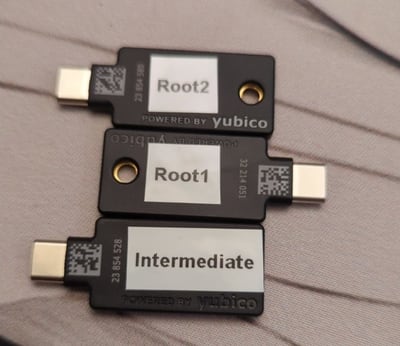
This post describes an offline PKI system using the following components:
- 2 YubiKeys for the root CA (with a 20-year validity),
- 1 YubiKey for the intermediate CA (with a 5-year validity), and
- 1 Libre Computer Sweet Potato as an air-gapped SBC.
It is possible to add more YubiKeys as a backup of the root CA if needed. This is not needed for the intermediate CA as you can generate a new one if the current one gets destroyed.
The software part#
offline-pki is a small Python application to manage an offline PKI.
It relies on yubikey-manager to manage YubiKeys and cryptography for
cryptographic operations not executed on the YubiKeys. The application has some
opinionated design choices. Notably, the cryptography is hard-coded to use NIST
P-384 elliptic curve.
The first step is to reset all your YubiKeys:
$ offline-pki yubikey reset
This will reset the connected YubiKey. Are you sure? [y/N]: y
New PIN code:
Repeat for confirmation:
New PUK code:
Repeat for confirmation:
New management key ('.' to generate a random one):
WARNING[pki-yubikey] Using random management key: e8ffdce07a4e3bd5c0d803aa3948a9c36cfb86ed5a2d5cf533e97b088ae9e629
INFO[pki-yubikey]  0: Yubico YubiKey OTP+FIDO+CCID 00 00
INFO[pki-yubikey] SN: 23854514
INFO[yubikit.management] Device config written
INFO[yubikit.piv] PIV application data reset performed
INFO[yubikit.piv] Management key set
INFO[yubikit.piv] New PUK set
INFO[yubikit.piv] New PIN set
INFO[pki-yubikey] YubiKey reset successful!
Then, generate the root CA and create as many copies as you want:
$ offline-pki certificate root --permitted example.com
Management key for Root X:
Plug YubiKey "Root X"...
INFO[pki-yubikey]  0: Yubico YubiKey CCID 00 00
INFO[pki-yubikey] SN: 23854514
INFO[yubikit.piv] Data written to object slot 0x5fc10a
INFO[yubikit.piv] Certificate written to slot 9C (SIGNATURE), compression=True
INFO[yubikit.piv] Private key imported in slot 9C (SIGNATURE) of type ECCP384
Copy root certificate to another YubiKey? [y/N]: y
Plug YubiKey "Root X"...
INFO[pki-yubikey]  0: Yubico YubiKey CCID 00 00
INFO[pki-yubikey] SN: 23854514
INFO[yubikit.piv] Data written to object slot 0x5fc10a
INFO[yubikit.piv] Certificate written to slot 9C (SIGNATURE), compression=True
INFO[yubikit.piv] Private key imported in slot 9C (SIGNATURE) of type ECCP384
Copy root certificate to another YubiKey? [y/N]: n
You can inspect the result:
$ offline-pki yubikey info
INFO[pki-yubikey]  0: Yubico YubiKey CCID 00 00
INFO[pki-yubikey] SN: 23854514
INFO[pki-yubikey] Slot 9C (SIGNATURE):
INFO[pki-yubikey]   Private key type: ECCP384
INFO[pki-yubikey]   Public key:
INFO[pki-yubikey]     Algorithm:  secp384r1
INFO[pki-yubikey]     Issuer:     CN=Root CA
INFO[pki-yubikey]     Subject:    CN=Root CA
INFO[pki-yubikey]     Serial:     1
INFO[pki-yubikey]     Not before: 2024-07-05T18:17:19+00:00
INFO[pki-yubikey]     Not after:  2044-06-30T18:17:19+00:00
INFO[pki-yubikey]     PEM:
-----BEGIN CERTIFICATE-----
MIIBcjCB+aADAgECAgEBMAoGCCqGSM49BAMDMBIxEDAOBgNVBAMMB1Jvb3QgQ0Ew
HhcNMjQwNzA1MTgxNzE5WhcNNDQwNjMwMTgxNzE5WjASMRAwDgYDVQQDDAdSb290
IENBMHYwEAYHKoZIzj0CAQYFK4EEACIDYgAERg3Vir6cpEtB8Vgo5cAyBTkku/4w
kXvhWlYZysz7+YzTcxIInZV6mpw61o8W+XbxZV6H6+3YHsr/IeigkK04/HJPi6+i
zU5WJHeBJMqjj2No54Nsx6ep4OtNBMa/7T9foyMwITAPBgNVHRMBAf8EBTADAQH/
MA4GA1UdDwEB/wQEAwIBhjAKBggqhkjOPQQDAwNoADBlAjEAwYKy/L8leJyiZSnn
xrY8xv8wkB9HL2TEAI6fC7gNc2bsISKFwMkyAwg+mKFKN2w7AjBRCtZKg4DZ2iUo
6c0BTXC9a3/28V5aydZj6rvx0JqbF/Ln5+RQL6wFMLoPIvCIiCU=
-----END CERTIFICATE-----
Then, you can create an intermediate certificate with offline-pki yubikey
intermediate and use it to sign certificates by providing a CSR to offline-pki
certificate sign. Be careful and inspect the CSR before signing it, as only the
subject name can be overridden. Check the documentation for more details.
Get the available options using the --help flag.
The hardware part#
To ensure the operations on the root and intermediate CAs are air-gapped, a cost-efficient solution is to use an ARM64 single board computer. The Libre Computer Sweet Potato SBC is a more open alternative to the well-known Raspberry Pi.1
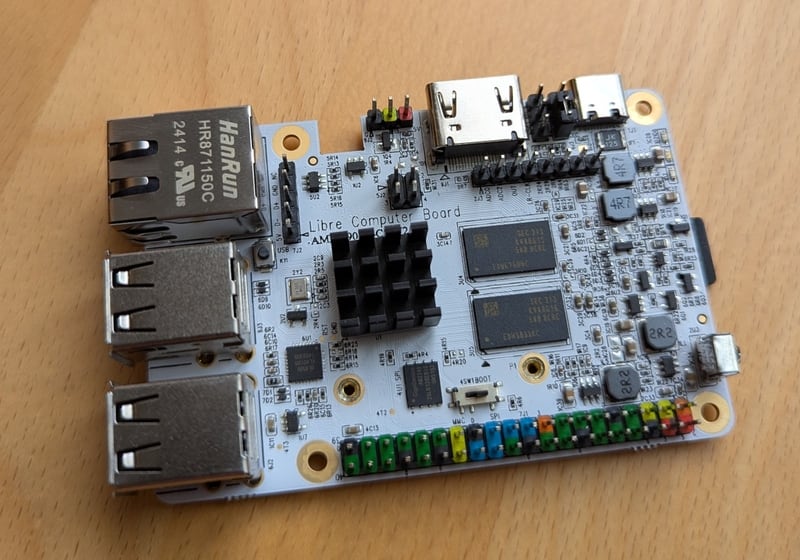
I interact with it through an USB to TTL UART converter:
$ tio /dev/ttyUSB0
[16:40:44.546] tio v3.7
[16:40:44.546] Press ctrl-t q to quit
[16:40:44.555] Connected to /dev/ttyUSB0
GXL:BL1:9ac50e:bb16dc;FEAT:ADFC318C:0;POC:1;RCY:0;SPI:0;0.0;CHK:0;
TE: 36574

BL2 Built : 15:21:18, Aug 28 2019. gxl g1bf2b53 - luan.yuan@droid15-sz

set vcck to 1120 mv
set vddee to 1000 mv
Board ID = 4
CPU clk: 1200MHz
[…]
The Nix glue#
To bring everything together, I am using Nix with a Flake providing:
- a package for the
offline-pkiapplication, with shell completion, - a development shell, including an editable version of the
offline-pkiapplication, - a NixOS module to set up the offline PKI, resetting the system at each boot,
- a QEMU image for testing, and
- an SD card image to be used on the Sweet Potato or another ARM64 SBC.
# Execute the application locally
nix run github:vincentbernat/offline-pki -- --help
# Run the application inside a QEMU VM
nix run github:vincentbernat/offline-pki\#qemu
# Build an SD card for the Sweet Potato or for the Raspberry Pi
nix build --system aarch64-linux github:vincentbernat/offline-pki\#sdcard.potato
nix build --system aarch64-linux github:vincentbernat/offline-pki\#sdcard.generic
# Get a development shell with the application
nix develop github:vincentbernat/offline-pki